


Without security patching, protection against cyber attacks is inadequate
Security patching is an essential part of endpoint protection and is an integral part of IT security processes in companies. Various statistics show the considerable risks that unpatched software harbours. For example, a survey carried out by Ponemon shows that 60% of breach victims were breached due to an unpatched known vulnerability where the patch was not applied.
So why is security patching not carried out to a sufficient extent, even though it is so important for protection against cyber attacks?
The answer: companies often consider the installation of security patches to be too complex and time-consuming.
The fact is, however, that patching is essential for security and therefore for the long-term success of a company. However, there are five key points to bear in mind.
5 important tips for security patching
1) Automate processes
Automation is the optimal approach to ensure that security patches can be installed without taking an excessive amount of time. With NinjaOne's patch management tool, organisations can easily configure their security patching and then let it run automatically without worry.
2) Review all security patches
Before applying a security patch, organisations should run it in a suitable test environment to ensure that it works properly. Although testing takes time and resources, this extra effort is worthwhile as it prevents potential problems with devices or even the entire IT infrastructure.
3) Be proactive and prioritise security updates
To ensure that all systems are secure and up-to-date, IT departments should be proactive and prioritise security updates at the top of their agenda. Proactive notifications and alerts are an important support for this. They ensure that all updates can be carried out on time and effectively.
4) Create a complete overview of IT resources
An IT asset inventory lists all of a company's IT resources. A recommended approach is to create a complete overview by device type, operating system, hardware and third-party applications. Once a company has a clear picture of its IT assets, it can compare known vulnerabilities with its inventory and create a sensible order of patching.
5) Develop guidelines for patch management
These guidelines structure the steps in the patching process and help IT departments to efficiently prioritise, test, implement and monitor their patches. As there are different patching guidelines, organisations should choose the one that suits their specific IT environment and needs.
Admittedly, comprehensive patching can take time. However, this is outweighed by the enormous importance for the cyber security of companies, and there are solutions that can help automate the cumbersome parts of patching to make organizations more efficient and productive. Companies should continuously address the issue of patch management and develop their patching strategy, not only to prevent cybercrime, but also to ensure the smooth running of their organisation.
By Andre Schindler, GM EMEA and SVP Global Sales at NinjaOne

Meet the NinjaOne steam on stand 461 at SITS, The Service Desk & IT Support Show on 14-15 May 2025 at Excel London.


Every Child Online announced as official SITS and MSP Show charity partner
SITS and the MSP Show are excited to be partnering with Every Child Online for their shows on 14-15 May at Excel London.
The start-up charity’s goal is to help close the digital divide and work towards ending digital poverty. They have received over twelve thousand donated laptops and PCs from companies and the public. To date, Every Child Online has received, refurbished and donated for free; over 6 million pounds of devices to schools, educational clubs, Social Service Departments and other charitable organisations supporting underprivileged children and young adults.
"The IT industry thrives on innovation, but it also has the power to transform lives. By donating unused tech, businesses at SITS and the MSP Show can help equip the future workforce with the tools they need to succeed." Commented Mike Tarbard, Chief Executive Officer at Every Child Online.
Attendees will be able to meet the Every Child Online team at the shows on stand 780. They will be sharing information about their work and how people can get involved to help support their mission.

Event Director, Alice Fulton said “We're thrilled to be working with Every Child Online this year, they are a perfect fit for the shows as we’re both committed to accessibility, and value the importance of digital inclusion. We hope to empower the next generation with the tools they need to thrive in education and beyond.”
SITS and the MSP show boast the only free ITSM education programme in Europe, made up of seminars, panels, Breakfast Briefings and Hot Topic workshops.
The event is the largest in Europe focused on IT Service Management. 70+ ITSM vendors will be showcasing the latest IT service solutions, aiming to enhance the efficiency of IT Service Delivery.
Last year the first ever MSP Show welcomed over 1200 visitors, and after being embraced by the MSP Community, the show is set to be even bigger and better in 2025.
SITS, The Service Desk & IT Support Show and the MSP Show are back 14-15 May 2025 at Excel London. Register for free here.
Meet the brand: Uptime Labs
Uptime Labs lets your entire team become experts at managing any type of incident so you can reduce downtime.
Users will develop competencies in commanding incidents, scoping, incident mechanics, communication, escalation, security awareness, and technical knowledge.
What do Uptime Labs do?
Our mission is simple – we are here to help companies master incident response.
We created the world's first AI-driven incident management simulation that helps teams build confidence, sharpen their skills, and stay cool under pressure - no matter the incident. It enables entire teams to master incident response, reducing downtime while developing expertise in leadership skills, scoping, incident mechanics, communication, escalation, security awareness, and technical knowledge.
How did you get started?
After 15 years as sleep-deprived software engineers on support rotas for financial trading platforms, we know the pressure first-hand. We’ve justified millions spent on monitoring and APM tools - only to realise they’re useless if engineers are encountering them for the first time during a crisis.
We learned the hard way: investing in tools means nothing if your team isn’t prepared. That’s why we created Uptime Labs - turning stress into something manageable, and even fun, by gamifying the training.
What are you looking forward to most at SITS?
Connecting with individuals and companies seeking incident management support, where we can share insights and offer over 20 years of expertise in handling complex incidents.
Why should visitors come to your stand?
Looking to hone your skills and improve your uptime?
Our platform:
- Reduces time to respond
- Business suffers shorter outages
- Engineers get time back
- Drives consistency across team members
- Closes team skill gaps
- Everyone uses the same incident terms and strategies
- Creates measurable performance
- Track your team’s progress, wherever they are located
- Comply and evidence a formal incident response training plan
If you want to mitigate risk, or discuss what risk looks like, visit us at our stand.

Kaseya Continues Strong Momentum in Q1 with New Product Innovations and Major Award Wins
Kaseya, the leading global provider of AI-powered cybersecurity and IT management software, has released several major technology innovations in Q1 that continue to fuel the company’s strong growth. After delivering its best-ever financial results in 2024, Kaseya’s momentum continued with the launch of new AI-driven product capabilities that make customers more efficient, and profitable.
"We are pursuing an aggressive innovation schedule to extend our leadership in the market,” said Ranjan Singh, Chief Product Officer, Kaseya. “We continue to build on the Kaseya 365 platform and have launched several critical capabilities to help customers establish a solid security posture against the latest and most aggressive cyber threats, all while making them the most efficient IT organizations in the industry.”
Product Innovations
As a fully integrated IT and security platform, Kaseya 365 makes it possible to deliver innovations to the market faster than competing solutions. New product capabilities recently released include:
- Compliance Manager GRC: New enhancements that simplify compliance for customers. Automates the risk management process, including readiness tracking and remediation guidance.
- Autotask: The next generation of Autotask leverages AI to give customers a recap of actions taken on IT tickets to save time and improve the quality of documentation.
- IT Glue Smart SOP Generator: Automates IT process documentation in real time by creating SOPs effortlessly, ensuring accuracy, efficiency, and consistency across teams.
- myITprocess: New capabilities that save valuable time for IT teams by automating data gathering across platforms, like PSAs, RMMs and security tools.
- Vonahi’s Grey Box Internal Network Penetration Testing: Allows vPenTest to pinpoint sensitive data and potential vulnerabilities accessible through user accounts to stop attackers from gaining access and causing considerable damage.
Industry Awards
Kaseya products have received more than 20 G2 awards cumulatively in Q1, including Top 100 Global Company, Best Security Products and Best Software for Small Business. Additionally, 17 Kaseya products were named as Category Leader’s by the Channel Program, including audIT for Sales Presentations, RocketCyber for SOC and Datto for BCDR.
Kaseya’s innovation will continue to build on Kaseya 365 and bring improved products and experiences for customers. See Kaseya’s latest innovations and product launches live at Kaseya Connect, in Las Vegas from April 28 to May 1, 2025. To register for the event, go here.
By Kaseya
Meet the Kaseya team on stand 771 at SITS, The Service Desk & IT Support Show on 14-15 May 2025 at Excel London.
Meet the brand: LapSafe®
Learn more about LapSafe®, their story and capabilities, before meeting the team at SITS this May!
What do LapSafe® do?
LapSafe® is a leading provider of smart lockers and IT automation solutions, specialising in secure device management, loaning, and charging. Our smart lockers streamline IT service desks, automate device distribution, and enhance workplace efficiency across multiple sectors, including education, healthcare, and corporate environments.
How did you get started?
LapSafe® pioneered the first-ever storage and charging solution over 25 years ago, revolutionising how organisations manage IT devices. Since then, we have continued to innovate, helping businesses and educational institutions automate device access, improve IT workflows, and enhance user experience with our advanced smart locker solutions.
What are you looking forward to most at SITS?
We're excited to connect with ITSM professionals and showcase how our smart lockers can transform IT service desks. SITS provides a great platform to discuss automation, efficiency, and how technology can streamline IT operations, reduce downtime, and improve service delivery.
Why should visitors come to your stand?
Visitors will see first-hand how our smart lockers can automate IT support, reduce workloads, and enhance the end-user experience. Whether it’s automating device loaning, streamlining maintenance processes, or managing IT assets more effectively, our solutions help IT teams work smarter. Plus, we’ll have live demos to showcase the power of our ONARKEN® smart locker software!

SITS 2025: Seminar Programme announced
The ITSM community are set to return to Excel London on 14-15 May for SITS – The Service Desk & IT Support Show and the MSP Show.
SITS is proud to host the only free ITSM education programme in Europe, made up of seminars, panels, Breakfast Briefings and Hot Topic workshops.
Alongside 70+ ITSM vendors who will be demoing the latest software on the market, visitors can take advantage of two packed days of sessions, full of practical advice and industry updates.
Topics cover everything from agentic agents and problem management to security and automation. Seminars will be delivered by experts from the industry and beyond, with a focus on issues affecting professionals in and out of the office.
“The education programme offers a great opportunity to hear, share and discuss relevant, important and current topics from within our industry!” Commented visitor Elisa Garcia from Valeo.
Highlights from the programme
Thomas Mackenzie, Director of Product Strategy at Lansweeper will be delivering the seminar ‘Integrating cybersecurity into IT service management: Practical strategies for strengthening security’. The session offers practical strategies for enhancing cybersecurity within ITSM frameworks. It will explore how ITSM professionals can incorporate security measures into incident management, change management, and service request workflows. Thomas will highlight straightforward and actionable steps that can be seamlessly integrated into existing processes, without adding unnecessary complexity.
‘Redefining success: Navigating career growth and change in IT service management’ with Georgina Otubela from Brit Insurance, will explore how IT professionals can redefine success and navigate career growth in a rapidly evolving industry. Attendees will gain advice on overcoming barriers like imposter syndrome, leveraging mentorship, and future-proofing their careers.
For a case-study on how partnership-driven collaboration empowers teams, Terry Haines, Alf Mounter and Glenn Grice from the Maritime and Coastguard Agency will be delivering the session ‘How IT supports saving lives at sea.' Visitors will discover how IT professionals play a vital role in safeguarding lives, driving results, and cultivating a sense of purpose and belonging, reinforcing the idea that IT is not just a support function but a cornerstone of lifesaving operations at sea.
‘SAM as a Service - acting as an internal MSP’ will be delivered by Julia Veall from Vodafone VOIS. The session will dive into how Vodafone VOIS is changing the way that Software Asset Management can be delivered internally to their customers. As well as how acting as an internal MSP is empowering them to build standardised processes and customer journeys using appropriate tooling.
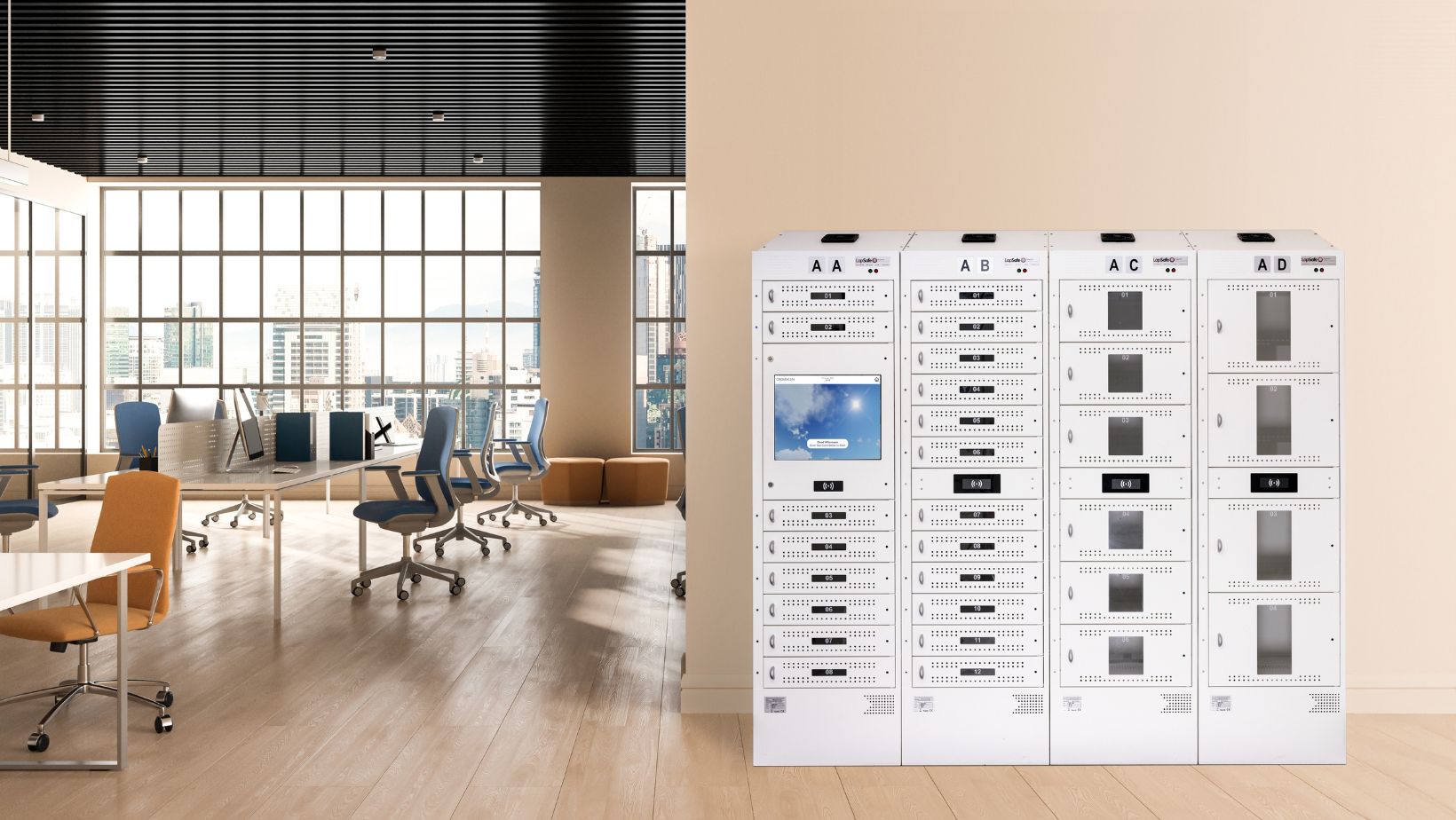
How MSPs are elevating IT services with smart lockers
Managed Service Providers (MSPs) are under increasing pressure to deliver fast, seamless IT support while reducing costs and improving efficiency. Travelling between sites to swap out devices, deploy updates, or provide peripherals takes time and resources—slowing down operations and frustrating end-users.
To solve these challenges, smart lockers and IT vending machines are transforming the way MSPs manage assets, automate workflows, and provide 24/7 self-service support.
How Smart Lockers & Vending Machines Are Revolutionising MSP Operations
- Integrated, Remote Management
With seamless integration into existing IT management systems, smart lockers and vending machines allow MSPs to:
- Deploy assets remotely
- Set user permissions and group rules
- Track bookings, drop-offs, and collections
- Automate software updates and device replacements
This reduces manual intervention, streamlining IT workflows and improving efficiency.
- Fewer Site Visits, Lower Costs
Constantly travelling between sites to swap devices, update software, or provide accessories is time-consuming and costly. With smart lockers and vending machines, MSPs can:
- Minimise unnecessary trips by automating device exchanges
- Remotely deploy IT peripherals without technician visits
- Reduce travel costs and lower carbon footprint
This saves both time and operational costs while improving service speed.
- Enhanced IT Service Levels
End-users expect fast, reliable IT support. Smart lockers and vending machines enable MSPs to:
- Instantly deploy new or replacement devices
- Remotely manage software updates and repairs
- Ensure users always have access to working equipment
This results in higher productivity, reduced downtime, and improved user experience.
- 24/7 Self-Service Support
Eliminating IT bottlenecks, smart lockers provide round-the-clock access to:
- Automated device loans – laptops, tablets, and more
- Drop-off & collection services – seamless automated exchange
- Personal storage lockers – secure personal storage
- Peripheral vending – instant access to accessories
By reducing queues and wait times, MSPs can deliver faster, more efficient services with less manual effort.
- Advanced Asset Tracking & Security
Keeping track of IT assets can be challenging, but smart lockers provide:
- Full visibility of device loans and returns
- Custom alerts & notifications for better asset control
- Real-time reporting on usage and inventory
With automated tracking and reporting, MSPs can eliminate lost devices and ensure equipment is always available when needed.
- Enhanced decision making
Full reporting suites can enhance decision-making, improve accountability, and provide real-time insights into assets.
- Generate detailed reports on demand
- Schedule automated email reports
- Export data as graphs for easy analysis
The Future of IT Service Management
Smart lockers and IT vending machines are game-changers for MSPs. By automating IT support, reducing manual workload, and enhancing service levels, these solutions help MSPs save time, cut costs, and improve end-user satisfaction.
Why LapSafe®?
LapSafe® provides industry-leading smart lockers and IT vending solutions designed to improve MSP efficiency. LapSafe® solutions ensure secure, automated, and reliable IT service management—helping MSPs deliver outstanding service with ease.
By LapSafe®
Meet the LapSafe® team on stand 264 at SITS, The Service Desk & IT Support Show on 14-15 May 2025 at Excel London.

Chatbots for service desks: boosting ITSM efficiency and satisfaction
In today's fast-paced world, nobody likes to be kept waiting. That's where chatbots for service desks come in. They're changing the IT Service Management (ITSM) game by providing quick, efficient, and cost-effective support with a human touch. This article will dive into how integrating chatbots with your ITSM software can take your service desk to the next level. From automated ticketing to instant answers and 24/7 support, it will demonstrate how AI-powered chatbots can help your service teams provide superior and scalable IT solutions.
What is a service desk chatbot?
So, what's a service desk chatbot? Simply put, it's an AI-powered assistant that handles support tasks within your ITSM, bringing that human touch to automated help. These helpdesk chatbots can chat with users through text or even voice, just like a real person would.
Thanks to natural language processing (NLP) and machine learning, these AI chatbots understand what people are asking and can respond appropriately. They can handle service requests, answer FAQs on the spot using information from your knowledge base, manage support tickets, and if things get too tricky, they know when to bring in a human agent. This not only boosts your employee experience but also makes your service desk more efficient.
Key features of a chatbot for your service desk
What makes chatbots for your service desk so special? Chatbots are equipped with a range of features that enhance IT support efficiency and user satisfaction, including:
- Automated Assistance. Chatbots are always on, ready to provide instant responses anytime, day or night. No more waiting for business hours to get help!
- Issue Resolution. They’re plugged into your knowledge base, so they can troubleshoot and solve common problems fast, or guide users through self-service solutions.
- Service Requests and Ticketing: Need to create or update a ticket? Chatbots can handle that, making the process smoother for both users and your IT support team. This means less manual work and more efficiency.
- User Interaction: Thanks to natural language processing, helpdesk chatbots communicate in a way that mimics the human touch. Plus, users can reach them through various platforms—web, mobile, or even their favourite messaging apps.
- AI and Machine Learning: With artificial intelligence and machine learning, chatbots continuously improve. They learn from every interaction, getting better at understanding and responding to users over time.
- Integration with ITSM Tools: Chatbots can seamlessly integrate with your existing ITSM tools, automating repetitive tasks and streamlining workflows. This boosts overall service desk efficiency and makes life easier for your support agents.
These features combined make service desk chatbots a valuable addition to any service team looking to enhance customer service and employee experience.
Benefits of implementing a chatbot at your service desk
Adding a chatbot to your service desk can take your IT support to the next level by offering some big benefits. Chatbots boost efficiency by handling routine queries and repetitive tasks in real time, which lets your support agents focus on more complex issues; this speeds up issue resolution and lightens the load on your human agents.
They also lead to cost savings because with chatbots managing common questions and service requests, you can reduce the size of your support team or free them up for other important tasks. This not only saves money but also improves the user experience—users get instant, consistent, and personalised customer support, leading to higher satisfaction and engagement.
Plus, as your business grows, chatbots provide scalability by easily handling more support inquiries without extra cost, ensuring smooth service even during busy times. They also enhance data and insights by collecting valuable information from every interaction, helping you understand user needs, refine your processes, and anticipate future demands. In short, implementing a chatbot at your service desk can transform your service team, improve employee experience, and deliver top-notch customer service.
Use Cases for Service Desk Chatbots
Service desk chatbots aren't just for IT support—they can make a huge difference across your entire organisation. Here are some ways they can help:
- IT Support. Chatbots can tackle technical issues by providing quick solutions and guidance on software and hardware problems. This reduces downtime and keeps everyone productive.
- HR Services. Got questions about policies or benefits? Chatbots can handle those employee inquiries and assist with onboarding new hires, making the process smoother and more efficient.
- Customer Support. Chatbots can manage customer service inquiries, providing product info and assistance. This improves the customer journey and frees up your support team to handle more complex issues.
- Facilities Management. Need to report a maintenance issue? Chatbots can manage those requests and provide essential information, ensuring problems are resolved promptly.
These examples show just how adaptable chatbot service desks are. They can optimise and enhance various functions, making life easier for both your employees and customers.
Best Practices for Implementing a Chatbot at the Service Desk
To ensure your chatbot hits the service desk ground running and you get the most out of it, follow these best practices:
- Start by setting clear goals. Decide what you want your chatbot to achieve, such as improving response times, reducing your support team's workload, or boosting user satisfaction. Knowing your objectives will guide the development process.
- Choose the right technology by selecting an AI-powered solution that fits your needs, ensuring it has strong natural language processing capabilities to understand and respond to users effectively.
- Seamlessly integrate your chatbot with your existing ITSM tool to guarantee smooth communication and data sharing, making workflows more efficient.
- Keep your chatbot's knowledge base up to date through continuous training, regularly updating it with new information and training it to handle new types of queries.
- Monitor and improve its performance by keeping an eye on how your chatbot is doing, collecting user feedback, and using it to refine its responses and improve accuracy.
By following these steps, you'll set your chatbot —and your support team—up for success.
Challenges and solutions
Implementing a chatbot at the service desk isn't without its hurdles, but don't worry, there are ways to overcome them.
User Adoption
One of the first hurdles is getting users to actually engage with your chatbot instead of with the service desk itself. To boost adoption, make the chatbot interface friendly and easy to use, and spread the word about its benefits through internal communications. Offering training sessions can help users get familiar with how the chatbot works. By ensuring seamless and positive experiences, you'll increase user confidence and encourage them to use the chatbot regularly.
Handling Complex Queries
While chatbots are fantastic at dealing with routine questions, they might stumble when faced with complex issues that need a human touch. To handle this, set up a clear escalation process. Program the chatbot to recognise when a query is beyond its capabilities, so it can automatically hand the user over to a human agent who can provide the necessary expertise and resolution.
Maintaining Accuracy
Keeping your chatbot's information accurate and relevant is crucial for building trust and effectiveness. Regularly update the chatbot’s knowledge base with the latest info and conduct continuous testing and refining of its algorithms. Adding feedback loops where users can report any inaccuracies helps you quickly spot and fix any issues, ensuring the chatbot remains a reliable resource.
By addressing these challenges with thoughtful strategies and ongoing improvements, organisations can optimise the performance and acceptance of their service desk chatbots.
Future Trends in Service Desk Chatbots
What's next for service desk chatbots? The future is looking bright, with some exciting trends on the horizon:
Advancements in AI and Machine Learning
As artificial intelligence and machine learning technologies continue to evolve, chatbots will get even smarter. They'll handle more complex queries with greater accuracy, understand context better, and learn from every interaction to keep improving.
Integration with the Internet of Things (IoT)
Imagine your chatbot interacting directly with IoT devices. Users could monitor, control, and get updates from their devices using simple conversations with the chatbot. This opens up new possibilities and expands how desk chatbots can help.
Personalisation
Chatbots will become more personalised, using data insights and understanding user behaviour to offer tailored support. They'll anticipate user needs and preferences, making the interactions even more relevant and helpful.
These trends point to a future where chatbots are more powerful, versatile, and in tune with individual user needs than ever before.
What to take away from this article
Chatbots for your service desk are changing the game in ITSM by providing fast, efficient, and cost-effective support. We've looked at their key features—like 24/7 assistance, handling service requests, and smooth integration with your existing tools.
The benefits are clear: increased efficiency, cost savings, happier users, and valuable insights from data. We've also explored real-world use cases, shared best practices for getting started, and offered solutions to common challenges. Looking ahead, advancements in AI, IoT integration, and personalisation are set to make chatbots even more powerful and user-friendly.
By Clementine Jones, TOPdesk
Meet the TOPdesk team on stand 231 at SITS, The Service Desk & IT Support Show on 14-15 May 2025 at Excel London.

Speaker Q&A: Csaba Járomi
Introducing Csaba Járomi, who has worked with GoTo for two decades, and has helped the company transform from its early start-up phase to the market leader in IT management, support, and business communications.
He currently manages a team of pre-sales solutions consultants finding the right product match for GoTo’s customers in EMEA.
Csaba will be delivering the session 'Optimize IT operations: Unlocking efficiencies and cost savings through vendor consolidation & integrations' at Theatre 2, on 15 May.
1. How did you get into the profession?
IT SaaS Solution consulting or Sales engineering is a world between 2 worlds – IT and Engineering focused people need communication and interpersonal skills, business focused people need IT and technology skills to be successful in this role.
I started my work-life over 20 years ago with an Economics & Business administration focused education and early career plan.
Soon, I found that my existing passion for computers, technology, and eventually SaaS through my love of computer gaming could be put to good use as a career.
I was lucky to be employed by 3AM Labs, a small software startup which later became LogMeIn, as a Technical Support rep where Sales colleagues overheard my calls with customers, started to call me into more and more pre-sales engagements.
Hence, Sales Engineering / Solutions Consulting found me – and later I developed into a leader in this profession, as I grew together with LogMeIn, now GoTo, over the last 20 years.
2. What do you enjoy most about what you do?
The variety of customers and customer problems that I get to investigate and solve during my job. In my early career as an individual practitioner, I had this myself, nowadays, I get exposed to customers and their stories mostly through my team.
As a Solution Consulting lead, I can act as a conduit between my team’s on-the-ground feedback, and GoTo’s high level product strategic direction. This is what I enjoy the most – understanding the problems, providing short, and eventually long-term solutions to them.
3. What’s your most memorable work moment?
There have been a few very interesting customers over my time, but the most memorable was to provide a software demo in a Dairy farm – while looking at cows going about their business.
A customer – who’s still using the LogMeIn suite of products today – operates Smart Dairy farms, and the engagement took place in Sweden, at one of their ‘Showroom’ farms with real cows, real milking machines, and real, well, real smells, too. A very different and memorable ambience to the usual “meeting room – projector – computer screen - office location” set up of SaaS software business.
4. What are the key points you’ll be covering in your seminar session at this year’s SITS?
My session will focus on the constant challenge that IT directors, IT leaders face – I’ll explore the questions like:
- What’s the best way to go about mission critical IT software? Consolidate to a single vendor for simplicity? Is that too risky?
- Buying the best match, best of breed software for each small business requirement? Is that worth it?
- Balancing cost optimization and operational efficiencies is not an easy task, and an ongoing battle, and I will aim to give my audience some food for thought, some practical steps for implementation of a Vendor-consolidation strategy.
5. What are you looking forward to the most at SITS?
I consider myself a SITS veteran - my first event was probably in 2006 or so, with HDI at London Olympia, and have been exhibiting pretty much every year since.
Always love the vibe, the team, the fellow exhibitors, the conference program – but first and foremost, the Partners, Prospects and Customers who I get to meet at our booth.
The quick qualification of their needs, what each visitor’s unique reasons are for being there, and finding a match to their pains with GoTo’s software to engage in a project later – that’s the most energizing aspect of SITS for me.

How Nourish transformed its IT asset and compliance management with Setyl
In 2023, Nourish, a software company specializing in social care, faced a rapid expansion. After acquiring CarePlanner, the company doubled its workforce to 140 employees and continued growing to 220 employees within the year.
This sudden growth put heavy pressure on the company’s IT asset and license management processes, which relied primarily on fragmented and error-prone spreadsheets.
“When we doubled in size overnight, it became immediately apparent that spreadsheets couldn’t keep up.”
— Adam Gleed, Head of Information Security at Nourish
To address these issues, the Nourish IT and Information Security teams adopted Setyl to manage their IT assets, including hardware, applications and licenses, and provide complete oversight, including:
- Complete asset lifecycle management: Tracking assets from purchase to disposal, and ensuring timely replacements.
- Seamless integrations into existing systems: Automatically importing asset and employee data from systems like Microsoft 365, Intune, Autopilot and BambooHR.
- Employee onboarding and offboarding: Effectively assigning and recovering assets during employee transitions.
- Comprehensive change history and activity logs: Maintaining detailed records of asset changes, all the way to storing disposal documentation.
- Application and license management: Tracking software licenses and application access.
- Vendor management: Streamlining vendor audits by sending built-in questionnaires directly to vendors and centralizing information.
- Centralized document repository: Storing all relevant documentation in one accessible place.
- Task workflows and maintenance reminders: Simplifying recurring tasks with built-in reminders.
The results?
The transition to Setyl significantly improved operational efficiency. Integrations with HR and IT systems reduced manual work and automated workflows, while having all information in one system improved visibility over all assets.
“The grunt work is done for us, giving me back time to focus on more critical tasks.”
— Nathan Briggs, ICT Manager at Nourish
Setyl will now also make Nourish’s ISO 27001 audits much more straightforward. All assets, their history and status, as well as other security information such as vendor details and application access, can be easily accessed at any time required for audit purposes.
Additionally, Setyl provided a quick and easy onboarding experience, and continues to support the team with open communication and prompt responses to any suggestions.
"There's a real comfort in knowing that the information I'm seeing is accurate and reliable. I don't have to check spreadsheets or look through cupboards anymore. It gives me peace of mind knowing everything is in one place and it's up to date."
— Nathan Briggs, ICT Manager at Nourish
By Setyl
Meet the Setyl team on stand 374 at SITS, The Service Desk & IT Support Show on 14-15 May 2025 at Excel London. Register for free here.